 Number 199 - December 1999 |
| ReadMe.1st: Oops!, Part 2 | ||
|
by Ken Johnson, kejohns@interaccess.com, From March 97 I/O Port Newsletter, Tulsa Computer Society | ||
|
"Oops!" One of the worst
things you can utter while sitting at your computer, particularly if
you've mistakenly deleted a necessary file or (worse yet) formatted a
disk with data on it. Last month we looked at how to recover from
deletions of files. This month, something even worse -- accidental
formats.
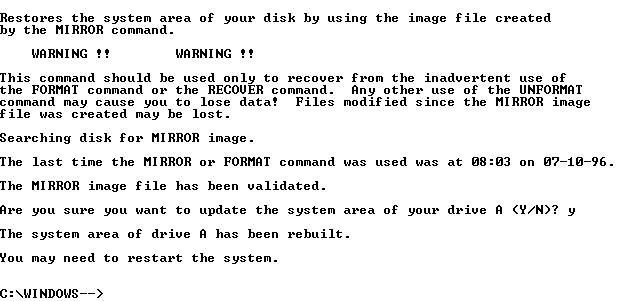
FORMAT and UNFORMAT Reformatting your hard drive accidentally is perhaps the worst Oops! you can make, since it has the highest potential for damage -- losing everything. There are a few safety nets in FORMAT, plus a few you can put in yourself. If disaster strikes, you can try to recover with UNFORMAT, which may be successful depending on how the FORMAT was done. FORMAT prepares a disk for use by "initializing" the surface; creating the sectors, File Allocation Table (FAT), and directory; and checking for and marking bad sectors so they are not used. Every new disk has to be formatted, including the hard disk in your computer. Typically that is done at the factory and you don't have to worry about it -- the worry is in reformatting the disk accidentally. A good analogy for what happens during a format is to think about a developer building a new subdivision out in the country. An unformatted disk is like undeveloped land, with random hills, gullies, and maybe a few random dirt roads. The first thing the developer does is flatten out the property, subdivide it into regular-sized lots, and build a series of roads leading to each lot. The developer then builds an office, and puts a map of the development on the wall. Maybe a few of the lots have swampy land and can't be built on; these are crossed off the map so that they won't be sold. As people start purchasing the lots, the developer crosses them off the map one by one. The disk from the factory is just one large surface with random bits and bytes on it. Formatting takes the disk and divides it into uniform sectors for use in storing files. The random magnetic hills and valleys are smoothed out, and the underlying maps and structures (like the Directory and FAT) are created. Any "bad" sectors unfit for holding data are marked. Continuing the analogy, reformatting a disk that currently contains files is like SERIOUS urban renewal: the bulldozers come in and flatten everything in their path. All the old buildings and roads are destroyed, and replaced with new vacant lots and new roads. A map of the area shows there is nothing left. One of the best enhancements in DOS 5.0 was the "safe" format, which is now the default if you specify no switches on the FORMAT command line. If you format a previously formatted disk, FORMAT will save the FAT and root directory information in a hidden file (called the MIRROR file) on the disk. The FAT and root directory are then erased, but the data itself is not deleted or physically overwritten. The UNFORMAT command uses this MIRROR file to completely restore the disk - if new data isn't written to the disk meanwhile. So the rule is, if you accidentally format a disk, UNFORMAT ASAP.
However, the FORMAT command includes a /U Unconditional switch, which does NOT save the MIRROR file and completely destroys all data on the disk. You can never UNFORMAT a disk that has been formatted with /U (at least through DOS; some disaster recovery companies have specialized hardware and software that can sometimes bring back an unconditionally formatted disk.) Similar to a safe format is the Quick format, which occurs when you FORMAT with the /Q switch. The Quick format also saves a copy of the FAT and root directory to a hidden MIRROR file, but does not scan the disk for bad areas (which the default safe format does). Only do a Quick format on previously formatted disks you know are in good condition. If the disk has not been previously formatted, an unconditional format will be done. There are a couple of safety nets in FORMAT to prevent an unintentional hard disk format. Starting with DOS 4.0, you had to explicitly enter the drive identifier of the drive to format. As far back as DOS 3.0 you got an error message if you try to run FORMAT on a hard disk: WARNING, ALL DATA IN NON-REMOVABLE DISK DRIVE C: WILL BE LOST! Proceed with format (Y/N)? You have to explicitly type in Y to start the format. |
As an additional
precaution, starting with DOS 3.3 you must enter the volume label of the
hard drive for the format to occur. Unfortunately, if your hard disk
doesn't have a volume label and you simply press [ENTER] when prompted
for the label, blank matches blank and the format will begin. So your
first and easiest protection against an accidental format is to use the
LABEL command (LABEL C:) to put a volume label on every hard disk in
your system.
For even more protection, include the NULL character (ASCII 255) as part of the volume label. You enter NULL by holding down the ALT key and typing 255 on the numeric keypad. The NULL will look like a space, but is a different character to DOS. Anyone trying to maliciously format the hard disk will probably type in a space instead of the NULL since they appear the same. But the labels won't match so the format won't proceed. Another option is to rename FORMAT.COM to something less noticeable to others and know only to yourself. Or again you could use the NULL character to rename FORMAT.COM to FORMAT<255>.COM, so that to use the command someone would have to enter the ASCII 255 from the keypad. Another option is to use DOSKEY to redefine "FORMAT" to run some other program, say DIR: DOSKEY FORMAT=DIR This in minimal protection against a nasty but knowledgeable person; they would know that by simply entering a space before FORMAT the original program would run and not the DOSKEY redefinition. Windows 3.1x and Windows 95 offer some additional FORMAT safety. In Windows 3.1 File Manager, under Disk | Format, you only have the option to format floppy disks. In Windows 95 Explorer you can right-click on a Hard Drive and select Format, but you cannot format a disk containing open files, including the drive where Windows 95 resides (typically your boot drive). Windows 95 will also not let you format the host drive for a mounted compressed drive. However, in Windows 95 you can run FORMAT.COM from the DOS command line; WIN95's FORMAT works exactly the same as in MS-DOS 6.x. UNFORMATing a Disk So what if, despite all your protection, you accidentally format a disk? Run UNFORMAT as soon as possible. If you've reformatted your hard drive (boot drive), you will need to boot from a floppy and run UNFORMAT from the floppy -- so have such an Emergency Boot Disk available. When you run UNFORMAT against a disk that has a MIRROR file (in other words, it wasn't unconditionally formatted with the /U switch), it restores the former root directory and FAT. As long as nothing has been written to the disk since the reformat, you will completely restore the disk. If data has been added to the disk, some original files may have been overwritten and are lost. Even so, you will still get back some data. If UNFORMAT cannot find a MIRROR file, it attempts to rebuild the disk's directory structure from the subdirectories. It cannot determine the names of the first level subdirectories (directly under the root), so it generically names them SUBDIR.1, SUBDIR.2, etc. It then tries to restore the files from the subdirectories; files in the root directory can't be recovered. If files are fragmented then cannot be recovered, since UNFORMAT can't location the other parts of the file. You'll have the option of truncating these files or deleting them completely. Like UNDELETE, the UNFORMAT command was removed from Windows 95. However, you can still use UNFORMAT.COM from MS-DOS 6.x, which will be in your original \DOS directory. Although accidentally deleting files or formatting your hard disk are serious, as you've seen there are some things you can do to allow you to prepare for, and prevent disaster. So instead of saying "Oops!" you can say "Oops! But No Problem!" For first part of this two part article see the October 1999 TOGGLE. Kenneth E. Johnson is Assistant Editor of the American Bar Association's Network 2d newsletter and Contributing Editor of DOS World Magazine. His book on Web authoring for attorneys will be published by the ABA in the spring of 1997. He is also a co-author of WordPerfect Law Office Solutions for DOS and of WordPerfect law Office Solutions for Windows |
|
|
Number 199 - December 1999


