 Number 200 - January 2000 |
| Corel Makes Linux Almost Nice With Quick Install and a Familiar Face | |||||||||||||||||||||||
|
by Scott Spanbauer PC World, First Look, Dec 1999 http://www1.pcworld.com/top400/article0,1361,13419+1+0,00.html | |||||||||||||||||||||||
|
Is Linux ready for the
masses? Until recently the answer was a resounding no. No matter how
fervently consumers wished for a Windows alternative, Linux was simply
too difficult for the average user to get up and running.
But at long last, a new version of the operating system is changing all that. Unlike competing versions--and despite its unfinished state--the beta version of Corel Linux installs nearly hands-free. And if the features Corel promises for the final product (due in mid-November) come true, this new flavor of Linux may be nearly as easy to install and configure as Windows 98. Unlike most other Linux products, Corel's version does not require you to test and tweak video settings for the graphical interface. You don't need to plumb the depths of drive partitioning either, and poring over the numbing catalog of installation options is strictly optional. You can progress from a bare hard disk to a graphical Linux desktop in four easy steps: Type in a user name, choose a default installation, decide where to install it, and click an Install button. In minutes, you're nearly ready to thumb your nose at Bill Gates. 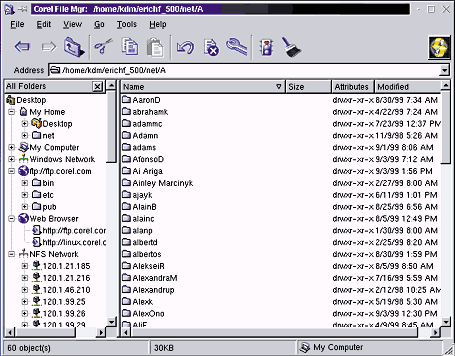
Not So Fast But first you have to configure things like printers, dial-up connections, and networking--just as you would when installing Windows. Getting these essentials working under Red Hat Linux or almost any other competing version means using Linux's collection of arcane command-line utilities and configuration files, a task that has driven more than one Linux newbie back into Microsoft's arms. Corel says its Control Center utility will consolidate most of these tasks in a centralized, Control Panel-like interface. Despite some glitches, Control Center let me configure Samba, Linux's Windows networking clone, in only a few clicks. Like many other flavors of Linux, Corel Linux is based on the 2.2.10 Linux kernel (a kernel is an operating system's core), and installs the Windows-like KDE graphical interface by default. But Corel has made many small improvements to KDE that will make it even more familiar to Windows aficionados. Besides making the Control Center changes, Corel has replaced the KDE file manager with Corel File Manager, a utility that displays drives, desktops, and network resources much as Windows Explorer does. But while Corel is doing its best to smooth the move from Windows to Linux, it can't work miracles. The Linux kernel still lacks support for such common PC devices as USB, DVD, internal ISDN cards, and Winmodems. USB support is likely to arrive sometime next year; there's no timeline for the other devices. |
Free Stuff
Corel Linux has the usual free applications, including Netscape Navigator and Corel's WordPerfect 8 for Linux. But it will ship sans Sun's free StarOffice 5.1, the office suite bundled with most shrink-wrapped Linux products. Corel plans to release its own office suite for Linux next year, but that one won't be free, and it won't be included in Corel Linux. In a unique role reversal, the suite will come with a free copy of Corel Linux. What neophyte Linux users need is tech support while installing and configuring their software. Corel, like competitors Red Hat and Caldera, will bundle limited technical support. But even if that support is stellar, customers who pick up a copy at the local computer mart should be prepared to sweat before they say goodbye to Windows. Lots o' Linux--And Not Just for Geeks
2 $79 deluxe version includes fuller edition of WordPerfect and more tools. |
||||||||||||||||||||||
|
Number 200 - January 2000
|


|
||||||||||||||||||||||