 Number 219 - August 2001 |




|
| AOL Pictures | |
| by Don Singleton, 1960 PC Users Group, Houston, TX | |
|
I have received frequent
questions from members regarding problems sending and receiving pictures
via AOL. At one time I had an AOL account, just to be able to answer
questions like this, but it got too expensive so I dropped it. I had so
much trouble getting them to stop charging my credit card (it took over 6
months) that I was not about to sign up for another account and hope
that I could cancel it before they started charging me.
Dolly Allison had some difficulties with Juno Web charging her so she went ahead and signed up for an AOL account. She was willing to set up a screen name so that I could explore this problem using her account. What I found out amazed even me. In their Version 5 software, it appears that AOL has two ways of sending pictures: one uses an icon that looks like a camera, the other uses the attach button. 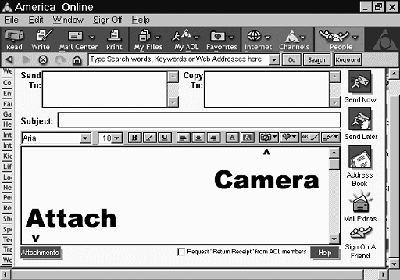
The camera icon works fine if you are sending pictures to someone else on AOL -- they see the picture immediately when they receive their email message, and they can send multiple pictures in one message, and all will work. However, if an AOL user tries to send an email using that icon to anyone not on AOL (any other Internet Service Provider), they won't get the image at all, and instead will just get the message "Unable to display image" (which sometimes shows up as pic.eml). If an AOL user uses the attach button to send a single picture to a non-AOL user, they will see the picture, just as easily as if it had been sent by a non-AOL user, HOWEVER if the AOL user sends two (or more) pictures, AOL will compress them into a Zip file, and the user at the other end will have to unzip it to see the pictures. Let us look at things from the reverse side, a non-AOL person sending email to an AOL person. If the email has one picture, the AOL user will see it with no problem, however, if the email has two pictures, AOL will group them together into what is called a MIME file. The AOL user will have to save it to disk, then use a special program to process the MIME file. The AOL user can find out how to handle MIME files by going to keyword MIME, and then clicking Handling Mime Files. |
If AOL was unable to
decode the MIME file, the attachment will be in MIME format, with a
filename extension of .MIM. One of the following programs will allow you
to decode the MIME file so that you can use it on your computer.
Recommended MIME programs: * MIMDECODE:V6.0 MIM Email Decoder (Win95, 98, 2000, & NT) Decodes MIME (.MME) with drag and drop. * WINZIP: V 7.0 SR-1 WinZip (Win95, 98 & NT) Decodes MIME (.MME) as well as compressed ZIP (.zip) files. * WINZIP: V6.3 SR-1 For Win31 (Win 3.1, 3.11) Decodes MIME (.MME) as well as compressed ZIP (.zip) files. * MIME:V4.3 Decode Shell Extension (Win95, 98 & NT) Adds a "decode" option to your mouse right-click context menu. * WINCODE: V2.7.3c Encoder/Coder (Win 3.1, 3.11, Win95) After you've downloaded and installed any of these programs, please be sure to read the READ ME guide or "Online Manual" for information on how to use the MIME program you downloaded. After you've decoded your MIME (.MIM) you may need to "un-zip" it. AOL may be the largest single ISP, but they are very, very, very far from being anywhere near to serving half of the Internet users, even in this country, much less around the world. What it amounts to is that AOL's nonstandard approach is foolish. It will be very confusing to their beginner users to remember that they can send and receive single pictures with no problem, regardless of who the other party uses, but that any transmission of more than one picture per email between AOL and non-AOL users will cause some additional work on the part of the recipient. AOL users must also be sure never to use the Camera icon unless the recipient is an AOL user. Now isn't that as clear as mud? When I first discovered all of these ramifications to the problem, I called Dolly and told her that AOL's handling of pictures was similar to what comes out of the south end of a north bound horse. I feel I must retract that. The stuff that comes out of the horse can be used for fertilizer, and hence can promote growth. I don't see how the convoluted way AOL deals with pictures can promote anything but confusion. Don is the President, Editor, and Internet SIG Leader for the Tulsa Computer Society, and a Director and the Web Master for APCUG. |
|
Number 219 - August 2001
|
|