 Number 221 - October 2001 |





|
| Problem Connecting a Serial Mouse | ||
| by Carl Tenning, Tacoma Open Group | ||
|
The Problem
I replaced the motherboard in an old 486 based computer with a Pentium motherboard (1997 BIOS). After the replacement, the serial mouse connected through the 9-pin RS-232 receptacle could not be found by the operating system. There are two serial port connections on the motherboard which can be configured in the BIOS Setup to either COM1, COM2, COM3, or COM4. The default is Channel-A configured to COM1 and Channel-8 configured to COM2. One of the connections on the motherboard has a ribbon cable to a 9-pin serial connector on the back of the computer and the other has a ribbon cable to a 25-pin serial connector. I found that by connecting a 25-pin to 9-pin adapter on the 25-pin serial connector, I could get the serial mouse to work through the 25-pin connection. But it would not [work] through the 9-pin connection. At first I suspected the 9-pin ribbon cable, but trying another 9-pin cable yielded the same results. I even checked out the pip-to-pin continuity. Then I suspected that maybe one of the two serial channels on the motherboard was faulty. This was not the case however, because I found that the mouse would work through the 25-pin RS-232 cable using either of the motherboard channels. It would simply not work through the 9-pin RS-232 cable. What am I missing here? The mouse previously worked through a 9-pin RS-232 connection with the old motherboard. Why won't it work through a similar connection on the new motherboard? The only difference is that on the old motherboard, the serial connection was provided through an ISA 110 card. The new motherboard has the serial ports integral with the motherboard. From: Robert Thomson To: Carl Tenning I would have to dig out the info but I would suggest that you try comparing the 25-pin pin-to pin connection diagram and the 9-pin pin-to-pin connection diagram to make sure that something fundamental (like a ground connection) is not switched or missing. I don't have any other suggestion. Mouse Mystery Solved My serial mouse would no longer work through the DB-9 serial port after replacement of the motherboard in my old 486-AT machine. It would work, however, through the DB-25 serial connector using a DB-9 to DB-25 adapter. Until the advent of the ATX machines, the serial ports were connected through 9-conductor ribbon cables to the back of the computer. Newer AT motherboards provided two serial ports right on the motherboard; older ones required an ISA 110 plug-in card. In either case, the 9-conductor cable was necessary to make the connection available to the outside of the computer. In all three of my AT computers, the connection at the motherboard or the 110 card was a 9 or 10 pin rectangular connector. In some cases pin 10 was missing or blocked off. In any case, pin 10 was not used, since the ribbon cable had only nine conductors. The old motherboard had the DB-9 serial port mounted on an ISA 110 card. The new motherboard provided the serial ports directly from the motherboard. So I had to go rummaging through my spare parts box to find a DB-9 serial port connector and cable. This cable looked identical to the serial cables in my other computers and also to the one on the ISA 110 card from the old motherboard. But what I discovered after doing a pin-to-pin continuity check, was that this cable was hooked up differently. Here are the RS-232 pin assignments for a DB-9 connector: |
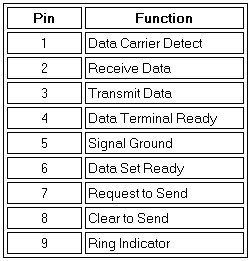
I also found from checking the continuity through the DB-9 to DB-25 adapter, that only five pins are used by the serial mouse; 2, 3, 4, 5, and 7.1 The correct connection, at least for this motherboard, had the ribbon cable conductors matching the DB-9 connector pin numbers as follows: 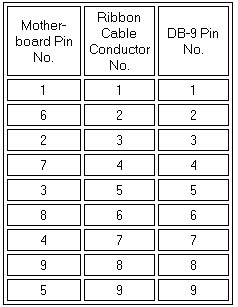
The wiring in the cable that would not work had the ribbon cable conductors alternating between the first and second rows of the DB-9 connector: 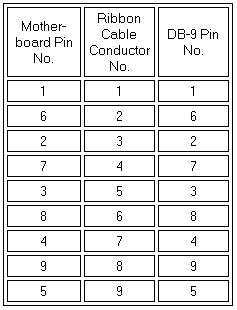
|
|
|
Number 221 - October 2001
|
|
|