 Number 243 - August 2003 |





|
| Random Access Memory | |
| Bob Elgines, CRCC Editor, elginesz@rraz.net | |
|
CORE MEMORY '50:
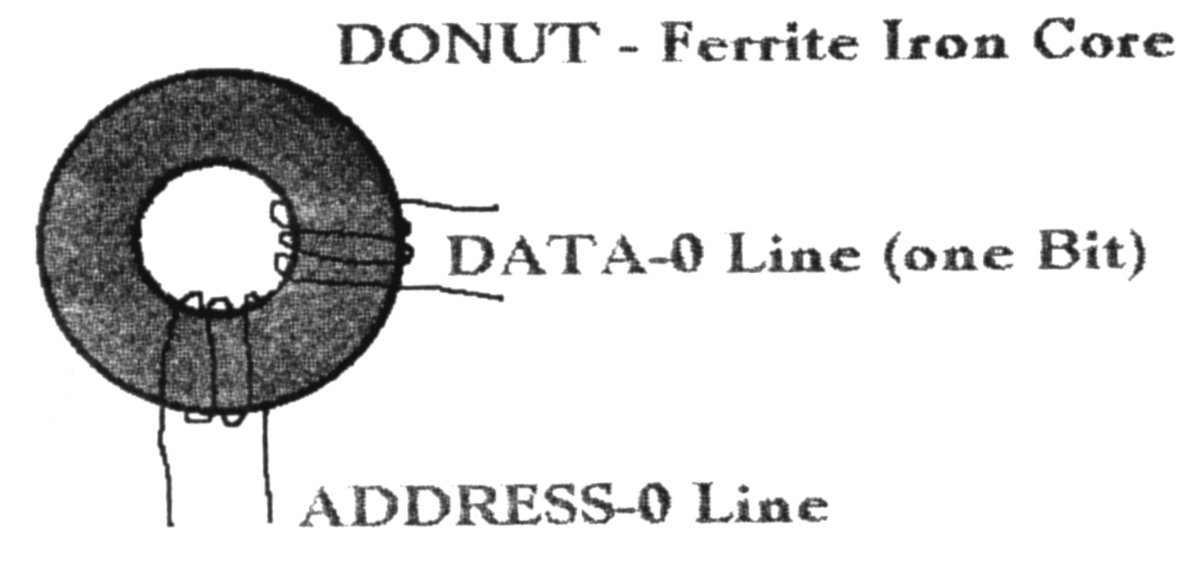
Pictured left is a single ferrite donut used in a core memory unit for one bite of memory. When the core is magnetized that is equal to a one and when it is demagnetized that is equal to a zero. This required a lot of power, so large DC power supplies were needed, producing a lot of heat. Core memory units were built to a maximum of 48K and were used in the US until 1993. The last USAF tube type computer operating in the United States with a memory core unit was finally shut down in the summer of 1986. It was located in the Block house just outside the main gate of Luke AFB in Arizona. The computer tube type processor took up a room 4Oft by 4Oft with ten each 3ft by 8ft high cabinets and only 48KB of RAM to cover the South Western United States SAGE aircraft tracking system with multiple RADAR input feeds. CHIP MEMORY '69: To speed up computers we now write and read more than one BIT at a time. Back in the sixties they decided a computer word would be a total of eight bites of data. Some of the first memory chips were lKB, then increasing to 4K, 16K, 32K, 64K. etc. As the late eighties came along such as the IBM 286 machine they decided to go with a 16 bit word (but as far as memory is talked about really two eight bit words) using 256KB individual chips directly on the mother board to a max of 1MB. Since you require a data line for each bit the DATA BUS was increased to 16 data lines. 30-pin SIMMS '89: They first came out with parity (requiring an extra chip for the parity bit) and then non-parity. Most of all your newer machines are capable of using non-parity (lower cost) type SIMMs. As the 386DX processor appeared, we now could shift a 32-Bit WORD around, but most programs still operate using 16-bit words at this time. Memory chips were put on separate printed circuit boards with 8 chips for no-parity and 9 chips for a parity bit location. So for a 16 bit word machine you would need two SIMM boards or for a 32 bit word machine you would need four each of the SIMM boards (32/8=4). 72-pin SIMMS '95: Of course, now with WIN 3.1 (WIN'95 and NT do the same thing) and the new programs and machines we can use true 32-bit word operation. In other words we can transfer 32 bits of data down the bus at any one time. This of course comes in handy mainly for graphics and internet operation. Otherwise there is not any difference other than you |
are required to have more memory to make
this operation successful. Like with the 8-bit word, 64KB of RAM was
great, but with the 32-bit word, 16MB of RAM is great. The reason is RAM
is still calculated using the old eight bit word, so now you need four
times more places in RAM for each WORD.(4 X 8-bites =32bites). The
72-pin SIMMs are a 32-bit setup so your machine would allow you too
change or add them one at a time.
EDO SIMMS '96: Then for the faster Pentium processors (now up to 266 MHz with MMX) and proper mother boards, the new EDO (Extended Data output) Simm memory boards came out with an added cache chip to help speed up memory access due to the mother board clock speed, which now runs up to 75MHz. 168 pin DIMMS '97: The new RAM boards are called DIMMs, which is a 64 bit memory board @ 66MHz (like two 72 pin SIMMs on one). In 1998 and 1999 higher speed board arrived at 100MHz and then at 133MHz. 184 pin DDR '01: 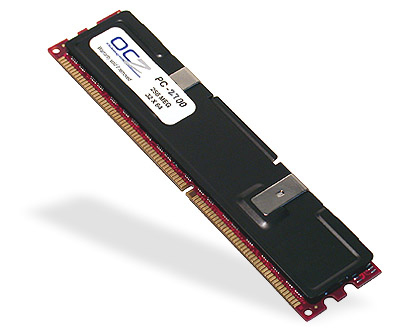 Some of the latest RAM is called DDR or PC2100 operating at 266MHz to
aid in the operation of Intel's new P4 processor and AMD's 2100. Then in
2002 a higher speed DDR333 or PC2700 operating at 333MHz and DDR433 or
PC3500 operating at 433MHz with CPUs over 1GHz.
Some of the latest RAM is called DDR or PC2100 operating at 266MHz to
aid in the operation of Intel's new P4 processor and AMD's 2100. Then in
2002 a higher speed DDR333 or PC2700 operating at 333MHz and DDR433 or
PC3500 operating at 433MHz with CPUs over 1GHz.
184/232 pin RAMBUS/RIMM/RDRAM '02: The latest type of memory operating up to 800MHz. Fast memory is finally here bypassing Mother board speed. The type 1066 is a 16Bit, 184 pin module, and therefore must be installed as pairs. They are available up to 512MB per module (RIMM). The type 4800 uses RSL (RAMBUS Signaling Level) technology to achieve transfer rates exceeding 4.8GB/sec of Bandwidth. The are 32 bit, a 232 pin module and available up to 256MB (RDRAM). The architecture of RDRAMs allows the highest sustained bandwidth for multiple, simultaneous randomly addressed memory transactions. The separate control and data buses with independent row and column control yield over 95% bus efficiency. The RDRAM's multi-banks configuration supports up to four simultaneous transactions. There is no restriction against any non-profit group using the article as long as it is kept in context, with proper credit given to the author. This article is brought to you by the Editorial Committee of the Association of Personal Computer User Groups (APCUG), an International organization to which this user group belongs. |
|
Number 243 - August 2003
|
|