 Number 249 - February 2004 |





|
| Gail's Specials | |
|
by Gail Pamphilon, Melbourne PC User Group Gail Pamphilon writes about two of her best loved handy utilities - Empty Temp Folders and Bookmark Wizard | |
|
Empty Temp Folders
Do you have problems when you want to keep just a few cookies for your favourite message boards and other sites, and automatically delete all the rest? Do you find yourself manually deleting all cookies except the few cookies that you wanted to keep? Empty Temp Folders is a (godsend) freeware applet that I learned about in alt.windows98, a newsgroup that I cannot recommend enough to all users of Windows 98. I searched high and low for such an application for months until finally I found it. The main purpose of this applet is to mark for preservation all 'good' cookies that the user wants to keep permanently, and their corresponding entries in the Temporary Internet Files folder, deleting all the rest. My experience is that cookie managers, which are usually shareware, do half the job rather badly. Empty Temp Folders deletes all cookies, and their related Temporary Internet Files folder files, at a click, but preserves the cookies and related files that you want to keep. It searches for temporary files and deletes as many of them as it can, given that the user is still within Windows. It also deletes clipboard contents and broken shortcuts and empties the Recycle Bin, among other tasks. 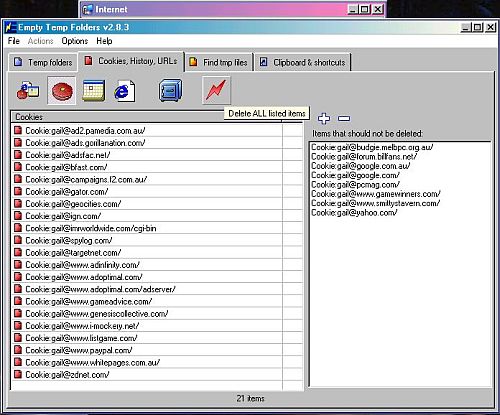
Figure 1. Empty Temp Folders in action. It purportedly deletes files in the c:\temp and c:\windows\temp folders, although I have not noticed this feature working. Perhaps a future release will fix the problem, but these files are easily deleted manually by the user, or by setting a batch file or TweakUI to delete them. Personally, I don't, as occasionally I use my temp folders for a short time. I have noticed that sometimes it is necessary to reboot after an online session, as Windows will not always allow me to delete temporary files until I have rebooted. This is the easiest way I have found to preserve a new cookie. While online, empty IE's cache and delete the history. (Tools, Internet Options, click on Delete Files, Delete Cookies and Clear History). Then revisit your favourite page, e.g. an online message board or Google Groups, and set your preferences, creating a cookie. Open Empty Temp Folders and you will see the cookie, which should then be the only new cookie in your cache. Mark it never to be deleted and close the application. Empty Temp Folders has other features that I haven't explored, but the author (Finn Ekberg Christiansen) did what so many shareware authors do not, and remembered the KISS principle. (Keep It Simple, Stupid). And it is free. The home page is www.danish-shareware.dk/soft/emptemp. |
Bookmark Wizard
As a reluctant convert from Netscape Navigator to Internet Explorer, I was unable to handle IE's Favourites. I was accustomed to Netscape's Bookmarks, and my home page has always been a HTML page on my PC listing all my bookmarks, each bookmark a clickable link. I didn't know what to do when I no longer had them. Bookmark Wizard solved the problem. It is a small, simple freeware application by Moon Software that does one thing beautifully - it converts IE's Favourites into a page of bookmarks, while preserving all your Favourites on your hard drive. Using Bookmark Wizard is easy. Following the links on the screen, it is necessary to set up and create your bookmark file only once. You can keep your bookmark file anywhere on your PC. Mine lives in c:\internet. You may even be able to keep your bookmark file online, but I have not explored this possibility. After the initial setup, whenever you have updated your Favourites and want to refresh your bookmarks file, all you need to do is click the Finish button on Bookmark Wizard and the job is done in a few seconds. Your bookmarks are now up to date! Importantly, you can update them on the fly, while online. When I delete Favourites, the links to the deleted Favourites are still there on my bookmarks page until I update the page. However, these links will still work until I make them disappear by running Bookmark Wizard. This is handy for those occasions when I think I have finished with a Favourite only to realise I need to visit that page one last time. Of course, new Favourites that I have added will not appear on my bookmarks page until I run Bookmark Wizard. I back up my bookmarks page frequently. It is easy to do as it is only one small file (currently 77.6 KB). This is something to consider, as Favourites constitute many files, which can be spread over many directories. Backing up Favourites can be annoying, and will speed disk fragmentation, but if you don't back them up, you may lose them. Unfortunately, Bookmark Wizard cannot export your bookmark file to Favourites: it can only create a bookmark file from your Favourites. If another member has found a way around this problem, please let us all know. In the meantime, keep backing up your Favourites periodically. 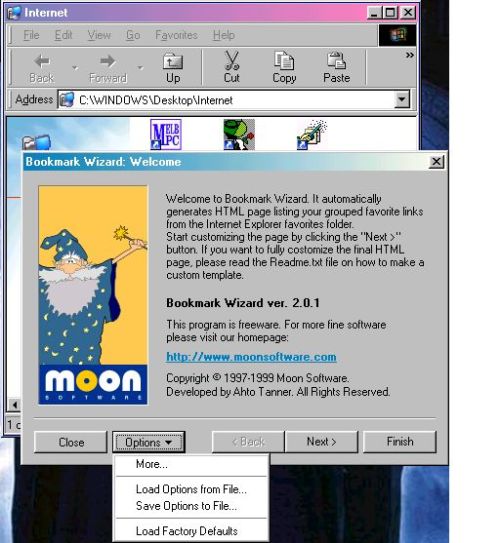
Figure 2. Bookmark Wizard in action. Some members may wonder why I bother with Bookmark Wizard. Why aren't Favourites enough, and isn't this a clumsy, albeit quick and easy, workaround? It's horses for courses. I can't understand how anyone can live with Favourites alone, while others can't understand why Favourites are not sufficient. Moon Software has other applications as well. Visit them at www.moonsoftware.com/download.asp Reprinted from the September 2003 issue of PC Update, the magazine of Melbourne PC User Group, Australia |
|
Number 249 - February 2004
|
|