 Number 249 - February 2004 |





|
| Virus.Zip? | |
| an excerpt from Quick Tips, p.83 Smart Computing Feb 2004 | |
|
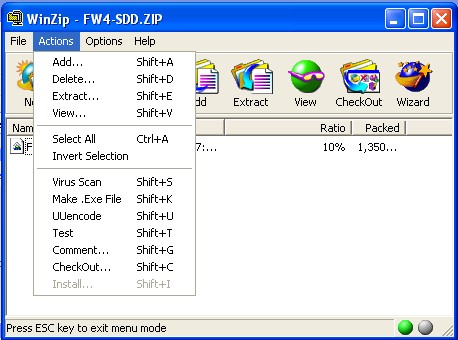
To make sure that the
zipped files you download don't contain files with viruses, you can run
your WinZip virus scanner on the contents of the zipped file before you
unzip it. Select the zipped file in Classic WinZip, then click on
Actions and Virus Scan. This activates your default virus scanner to
check all of the files in the zipped file. If you haven't already done
so, you will need to configure WinZip to use your virus scanner. The
program walks you through the process, which takes only a few moments to
complete.
TOGGLE Editor's Note My version of Winzip contains the following .EXE file choices: SCAN95, SCAN32, NAVW32, N32SCAN, N32SCANW, NAVWNT, WSCAN, SCAN, TBSCAN, F-PROT and IM. If your virus scanner is not included nothing happens. If you know its file name, presumably you can enter/overwrite it in the apprproate box. |
|
|
Number 249 - February 2004
|
|