 Number 255 - August 2004 |





|
| BCWipe Revisited | |
|
Note by Bob Thomson While we're on the subject of getting rid of files, securely, don't forget that great, free utility program, BCWipe, which meets DoD's requirements for deletion of militarily classified files.This neat program can wipe clean specified areas on your hard disk and overwrite them with meaningless characters, thus defeating any attempt to retrieve the data. The standard DoD setting is to overwrite those file areas seven times, but you can set it to as many times as you like. Deletion with wiping takes some time, but if the purpose is to completely and irrevocably delete files there is nothing better. BCWipe loads itself as "Delete with wiping", a choice in the dropdown menu which appears when you place the cursor over a file or filename and Right Click. Maybe we can re-issue it as a disk of the month, or on this year's best CD. Here's the blurb that goes with it: | |
|
BCWipe Software for
Windows 95/98/ME/NT/2000/XP The BCWipe utility is a shell extender for Windows 95/98/ME/NT/2000/XP, intended to securely delete your files. It supports correspondent U.S. Department of Defense recommendations (DoD 5200.28-STD). The BCWipe utility provides several ways to shred file's contents from the disk: a. Delete with wiping. Using 'Delete with wiping' command you can delete and wipe your files and folders using pop-up context menus in Windows Shell (Explorer program). b. Wipe free disk space. If you have previously deleted sensitive files using a standard operating system command, you may wipe free space on the disk where these files were stored--all previously deleted files' contents will be erased. c. Swap file wiping. BCWipe utility automatically wipes Windows Swap file contents when you run 'Wipe free disk space' command. d. Recycle Bin wiping. You can wipe contents of Windows Recycle Bin by pointing on the Bin icon by mouse and running the 'Wipe Recycle Bin' command from context pop-up menu |
e. Windows ME specific:
allows to wipe contents of special folders, created by Windows ME
'System Restore' function.
And here's the dispay when you invoke BCWipe: 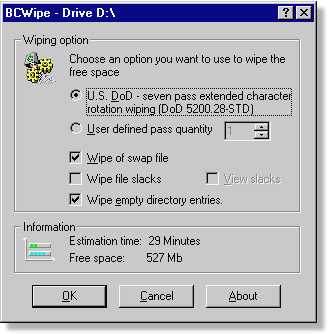
|
|
Number 255 - August 2004
|
|