 Number 258 - November 2004 |





|
| A Quick and Dirty Guide to Hardening Internet Explorer Against Spyware | |
| By Jeffrey A. Setaro, Danbury Area Computer Society, Inc. | |
|
Spyware has become one of
the most common problems facing users of Microsoft's Internet Explorer
web browser today. The following is a quick and dirty guide to hardening
Internet Explorer against spyware.
1. Make sure you computer is free of spyware before beginning this process. Spyware Guide offers a free on-line scanner to help you identify and remove spyware from your computer. If you have a slow connection or would prefer to work off-line you will need to download and install Ad-aware and/or Spybot Search & Destroy and then scan you computer with them. 2. Visit Microsoft's Windows Update site and install all the critical updates. Note: if you are using an older version of Internet Explorer you really should upgrade to IE 6 Service Pack 1 or later. 3. Next check the security settings in Internet Explorer. To do this start IE and select Tools > Internet Options to open the "Internet Options" dialog. See Figure 1. 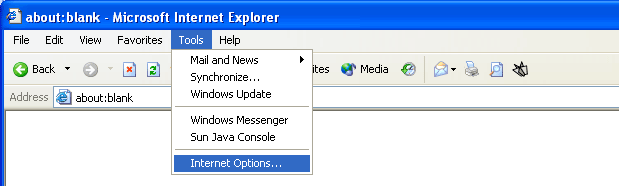
Figure 1 Select the Security tab and verify that the "Internet", "Local Intranet";, "Trusted Sites" zones are set to Medium. See Figure 2. 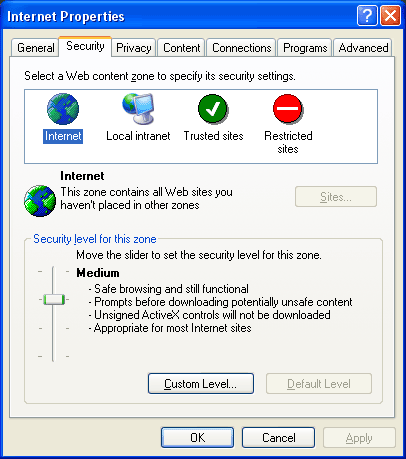
Figure 2 Next select the Restricted Sites zone and click "Custom Settings" and set everything to "Disable". Anything that can't be set to Disable should be set to "Prompt". See Figure 3. 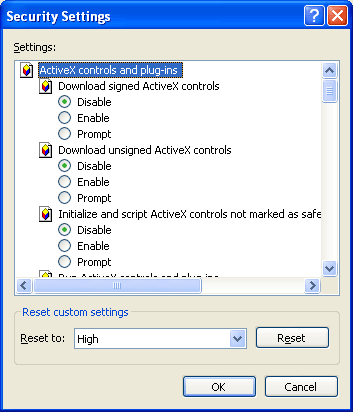
Figure 3 Now select the Advanced tab on and make sure that "Enable Install On Demand (Internet Explorer)" and "Enable Install On Demand (Other)" are disabled. See Figure 4. 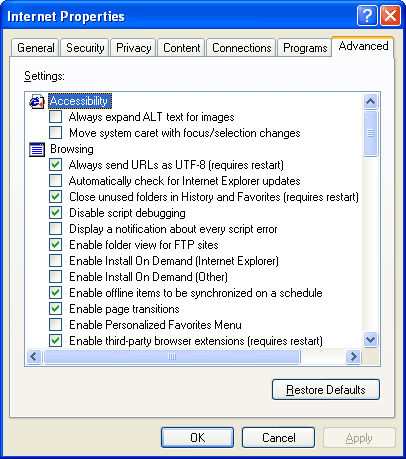
Figure 4 4. Visit www.spywareguide.com/blockfile.php and download the ActiveX block list and import in to the registry. 5. Visit https://netfiles.uiuc.edu/ ehowes/ www/ resource.htm#IESPYAD and download the IE-SPYAD block list and install it. 6. Periodically check for updated versions of the block lists and install them. 7. Last but not least install service pack 2 for Windows XP when it becomes available. Service pack 2 includes several important security improvements that can greatly enhance your on-line safety and security. Jeff Setaro is DACS Webmaster, and a frequent commentator on PC security issues. |
|
|
Number 258 - November 2004
|
|