 Number 259 - December 2004 |





|
| Use Run Commands for Fast Access to Almost Everything | |
|
by Linda Gonse Editor, Orange County PC Users' Group, July 2004 issue I/O Port Newsletter | |
|
Did you know that the Run
command is the Swiss Army knife of Windows' built-in apps? Using it can
make your computing time move along more quickly and smoothly.
Available since Windows 3.1, the Run command is often overlooked by users except as an option for installing programs, although techies use it frequently to access various system diagnostics and information. But, the average computer user should take a closer look at Run for its versatility to start programs and utilities, to open files and folders, to open web sites (when connected to the Internet), and as an alternative to placing shortcuts on the desktop. To use Run, left click on the Start button. Click on Run. If you hate to take your fingers off the keyboard to access Run, you can avoid using the mouse by pressing the Windows key on your keyboard and the letter "r". Commands are typed into the open box. 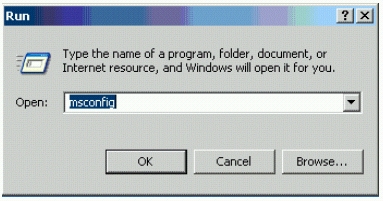
For example: In the open Run box, type msconfig to give you quick access to the Startup Configuration tab. Click on the StartUp tab, and check or uncheck boxes of programs you want to run on Startup. (You will be prompted to restart your computer. If you want your custom startup to take effect immediately, click OK.) Msconfig is one of the Run commands you will probably use often. (See figure below) 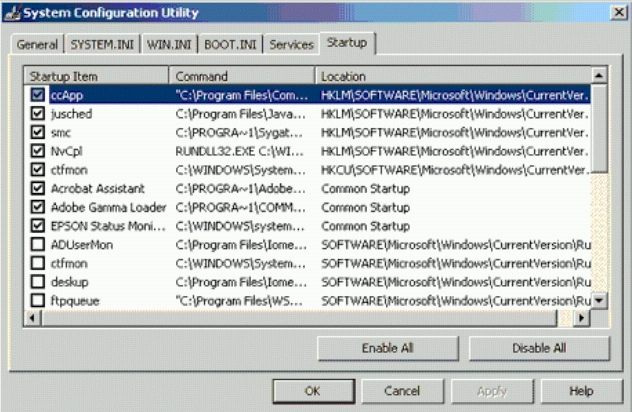
Following are other Run commands for you to try out. (If you get hooked on Run, you can search Google for "run commands" to find others. There are lots of them! Many will include "switches," familiar to DOS users, that will allow some of the commands to be customized.) |
Using the Run box can also give you a jump start on addressing your email messages. Go to Run and type in mailto: Among the switches you can type in the Run box to customize tasks are attrib, move, and xcopy. DOS command and switches, and instructions on how to use them in conjunction with Windows Run, are at www.Techiwarehouse.com/ DOS/ XP_DOS_Tutorial.html, and www.computerhope.com/msdos.htm#02 As you type commands in the Run box, a list of your Most Recently Used (MRU) commands--a history of the commands you've used--accumulate. The growing list can come in handy, because you can just click on any command to activate it without retyping it. On the other hand, you may not want to wade through a long list, or you may not want others to have access to the visible commands. In these cases, you need to clear the MRU commands. Here are two ways you can do that. There is no restriction against any non-profit group using this article as long as it is kept in context with proper credit given the author. The Editorial Committee of the Association of Personal Computer User Groups (APCUG), an international organization of which this group is a member, brings this article to you. |
|
Number 259 - December 2004
|
|