 Number 267 - August 2005 |




|
| Why Would I Need A Router To Connect To ADSL? | ||
| by Roger Brown, Melbourne PC User Group | ||
|
In the light of new ADSL opportunities Roger Brown gives us an introductory guide to ADSL routers
Melb PC members considering connecting to the group's ADSL service for the first time may be surprised to find that all of the "modems" supplied by Westnet (and indeed most "modems" generally available elsewhere) are actually routers - a device usually associated with connecting networks together or with managing traffic on the Internet. Why would an ordinary user require such a device? Are there advantages for ordinary users? To understand why these devices have become the standard method of connecting Broadband users to the Internet we should first consider how Broadband connections were set up before routers became common. Older Style Modem Only Setup When ADSL first appeared in Australia the standard device issued by Telstra (then the sole ADSL provider) was the Alcatel Speedtouch Home - a modem similar in some ways to the standard dial-up modem familiar to most Internet subscribers. With this setup, Telstra had to install additional software on the user's computer in order to support the ADSL connection and to enable user login. The computer was directly connected to the Internet as shown in Figure 1 and was completely visible to external probing. This meant that firewall software became crucial since ADSL subscribers could, and were encouraged to remain permanently connected. Any change in the user's computer arrangements (such as a new computer, change of operating system or disk reformat) required re-installation of the ISP login and/or other software, sometimes requiring additional assistance from the ISP. 4 Many users wish to share their new and expensive Internet connection with more than one computer. Although this was possible under the modem only setup, often it would prove awkward to implement and generally needed an additional network card in at least one of the computers. What Happens Now? Connecting via a Router Firstly, it is useful to think of this type of router as a small computer in its own right - one that comes with every- thing needed (including a built-in ADSL modem and a network switch), and it performs the following: 1. Log on and connect to the Internet 2. Share that Internet connection with any computer (one or several) that may be connected to it. 3. If more then one computer is connected, those computers will be automatically networked together. The networking advantages of this type of connection are obvious and don't need a great deal of comment here. But there are very significant advantages even if you have no intention of networking, or of using more than one computer. 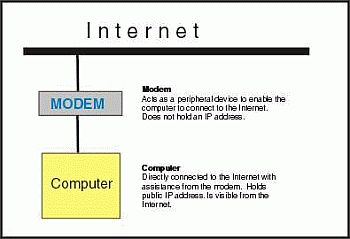
Security The Router acts as a hardware firewall. As shown in Figure 2, the router (with the help of its built-in modem is the device that is directly connected to the Internet. 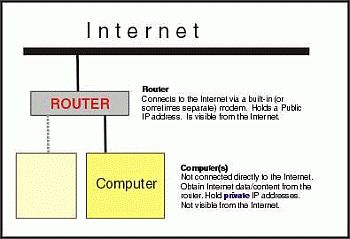
Any computer connected to the router also has Internet access, but only because requests for Internet data (such as when you browse a Web page) are sent to the router which in turn obtains the data from the Internet and passes it on to you. The router acts as an Intemet gateway to the attached computer (in much the same manner as a proxy server), except that none of your computer settings need to be changed. As the router is a simple device -it's not running Windows or any other complex operating system, and its without hard drive or rewritable software -it is very secure from intrusion or hacking. Routers are made with varying degrees of sophistication but unless told otherwise, the router will refuse any unsolicited, inward connection from the Internet. This means that the router shields the computers connected to it, protects them from intrusion attempts, and acts as a hardware firewall. This very significantly boosts overall security. |
With some units it is possible to disable the router component and run in a mode producing much tthe same setup as in Figure 1 -in bridge mode -but because of the significant security advantages, even if networking is never contemplated, all users are strongly encouraged to leave their router in its standard router mode. Do I Need a Firewall When Using a Router? Despite the significant additional protection a router provides, it is still strongly recommended that you run firewall software (ie. software firewall) on any computer connected to the Internet via a router. There are two reasons: 1. A router sharing an Internet connection can sometimes be fooled into allowing packets through to the computer(s) -packets that were not requested. A software firewall can deal with these very occasional stray packets. 2. A software firewall (other than the Windows XP firewall) will enable you to monitor and control outward traffic -which the router will not. Advanced users testing their setup with a site such as Gibson Research http://www.grc.com using the program ShieldsUp, may notice that their security setup will seem less secure with some ports being reported as "closed" rather than "stealth". This would be because the device visible from the Internet, and being probed by an intruder, is the router and it is responding. The probes do not reach your computer or its software firewall and your security is not in any way affected. Some types of routers simply drop the incoming probes, no answer is sent back and the would-be intryder has no feedback whatsoever. For all intents and purposes the probe that was sent to your IP address simply disappeared somewhere on the Internet (see inset, above). During a test at Gibson Research you may also notice that port 80 (your Web server port) is shown as "open". This is not a concern as long as the router's security settings provide for the router's Web interface to be available only to your local network. In that case, the Web page visible from the Internet is a default "403 Forbidden" page only. What If I Change Computers, or Try Linux? This is one of the best features of a router connection. Connecting a new computer is simply a matter of plugging it in. Provided that the new box has a network card (make sure you always specify one, for any new computer), there's nothing to install and little or nothing to configure. It's that simple. And if you decide to try linux it's just as simple. linux will recognise your network card and automatically give you Internet access with no trouble at all. Networking Even if you had never thought of trying networking, having a router makes it all so simple. Just plug and go. Give it a try. To Sum Up ADSL is a significant step forward so be warned, once you try it you will never want to return to dial-up. Your router based setup provides this connection with lots of flexibility and security. Happy high speed browsing. Reprinted from the October 2004 issue of PC Update, the magazine of Melbourne PC User Group, Australia |
|
|
Number 267 - August 2005
|
|
|