 Number 270 - November 2005 |





|
| (Un-)Grouping Task Buttons | |
|
by John Buck, SPAUG Newsletter, Jan 2005 Stanford-Palo Alto PCUG | |
|
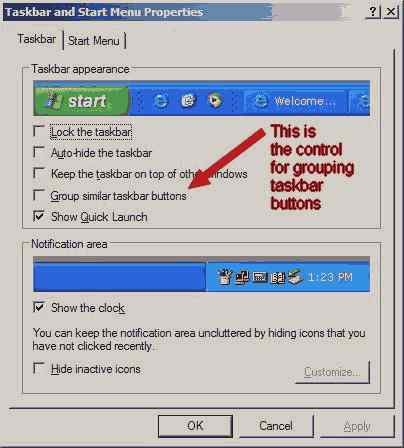
At our WebSIG meeting, the topic of WindowsXP display of open applications in the taskbar (that collection of buttons usually at the bottom of the screen that shows active applications). Earlier versions of Windows added a new button for every application and every instance of an application, so if you had three documents open in Word, you'd have three separate buttons to click on to switch to a Word document. Windows XP added the option to "Group similar taskbar buttons". Often it is turned on (checked), so instead of separate buttons, there is one button for Word with three documents that pop up above it. Some people like this, some don't. Fortunately, you get to decide which you get. Here's how. 1. Right-click on an empty taskbar area. 2. Select properties 3. In the Taskbar Appearance area, make "Group ..." choice. This screen was captured in XnView. Arrow and text were added in Photofiltre (both of which are on the Late 2004 club CD) (Not the TOG Library - Ed). While you're there, check out some of the other options - some people like to auto-hide the taskbar, some don't like it disappearing. |
|
|
Number 270 - November 2005
|
|