 Number 280 - September 2006 |





|
| Do I Have to Overwrite My Hard Drive Multiple Times? | |
|
By Stephen Elderkin, President of WhiteCanyon, Inc., | |
|
There are multiple standards for wiping drives, and each one recommends a certain number of hard drive overwrites. How many times do you really need to overwrite your drive in order to keep your personal information from falling into the wrong hands? Computer forensics expert Stephen Elderkin explains below how overwriting drives makes data unusable and how many times you need to overwrite your drive in order to prevent identity theft. How Many Times Do You Need to Overwrite Your Data Before It Is Truly Erased? Many people have asked questions such as "Why do programs like WipeDrive have so many options for overwriting the hard drive of a computer?" "Why is there not just one way of wiping the data?" and "Which option is right for my circumstances?" Unfortunately, a quick search of the Internet on these topics will only make you more confused because very few people have written about them correctly. Many of the articles you would find say to destroy your hard drive with a hammer because there is no safe way to completely erase the information stored on it. This myth is absolutely false. Why Are There Multiple Overwriting Standards? The main reason there are so many overwriting standards is because computers change at a rapid pace. Almost all of the standards were written by government agencies as a means of sanitizing unclassified drives. However, what most people forget to take into account is that old standards were written based on the specifications of old hardware. A 10 megabyte drive from the early 1980s has a very different architecture than a modern 120 gigabyte drive. How Have Hard Drives Changed Over the Years? One of the reasons hard drives had such small capacities several years ago is that the write and read heads of those drives were not very accurate. You could say they wobbled. The read and write heads are similar to the needle of a record player. A hard drive is composed of platters or disks, and each disk has a head that can read and write to the disk. As you can guess, the more the disk head wobbles, the less exact it will be. Modern drives have less wobble and can more accurately access the disk. This allows modern drives to have a much larger capacity than older drives by fitting more data into the same amount of space. A Close-up View of a Hard Drive Drives store data on disks using magnetic imprints that represent 1s and 0s. Figure 1 below shows what a bit would look like under an electron microscope. Notice that we can see three imprints of three different bits written to the disk in this example. Two bits were from a previous write while the large square represents the most recent bit written to this location. You can see that it is possible to read the data from a previous file stored on the drive by looking at the small amounts of magnetic charge left around the edges from previous writes. 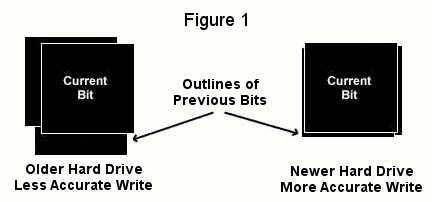
|
How Would Someone Access Old Data from My Hard Drive? Some people believe that with an electron microscope, advanced statistics, and special programming skills, you would be able to recover old data that have been overwritten. Even with these specialized and powerful tools, however, data recovery is so difficult that it can be called impossible; remember, we are looking at bits. There are millions and billions of them on a disk. It would take years to recover enough bits to begin looking for data, and even then you would not know which old bit imprints go with other old imprints. Looking at each of the possible combinations for billions of bits is a task so difficult that it can be called impossible. The newer the drive, the less wobble there is in the disk heads and the less chance there is of having any residual bit data to look at. This means the chances of recovering previously overwritten data on a newer drive are even lower. How Do I Prevent People from Looking at My Old Data? To erase data on a drive, programs like WipeDrive overwrite each bit on the drive with junk data. The junk data bit replaces the magnetic imprint of the previous bit, thus erasing it. Because drive heads wobble, it makes sense to overwrite the data on the drive more than one time because the drive head is going to track differently for different writes. The older the drive, the more writes are needed to ensure that the old data has been replaced by junk data. The newer the drive, the fewer passes are needed. How Many Overwrites Do I Need? So how many overwrite passes do you need? One. Data is so incredibly difficult to recover after being overwritten that even people with electron microscopes, advanced statistical tools, and specialized programming skills are not going to be able to recover data from your drive. It just isn't going to happen. You can search the Internet for examples where overwritten data were recovered and you will not find even one event where a person recovered more than a couple of bits of a byte. So the paranoid can rest easy. They can follow the Department of Defense standards to help them sleep better at night, but one overwrite is enough to protect your data from being recovered. Can you safely donate or sell an old computer without the risk of having your data stolen? The answer is yes if you use a program like WipeDrive to completely erase the computer before you let it leave your possession. There is no restriction against any non-profit group using this article as long as it is kept in context with proper credit given the author. The Editorial Committee of the Association of Personal Computer User Groups (APCUG), an international organization of which this group is a member, brings this article to you. |
|
Number 280 - September 2006
|
|