 Number 281 - October 2006 |





|
| Illustrating Emails with Digital Montage | |
|
by Charlene Brown, Big Blue and Cousins: The Greater Victoria PC Users' Association, September 2006 | |
|
This Baltic Cruise illustration below was originally going to be a Photoshop collage. I thought I'd scan some written material, then Copy and Paste fragments of the scan. I'd planned to define the parts to be collaged by selecting (drawing with the Polygon Lasso) shapes typical of the architecture of the Baltic. 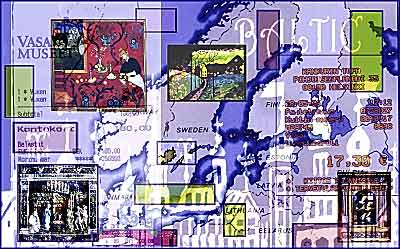
Illustrating Emails with Digital Montage - The Summer of '06 Collage: a technique invented by Picasso, who stuck fragments of newspaper and other pre-printed patterns onto his compositions, creating irrational conjunctions and incongruities of scale--as if his work didn't already have plenty of both. However, I like to use text in the local languages when doing travel collages, and I soon discovered that the only category in which I had plentiful material in the various languages was |
Visa receipts. They produced an interesting enough pattern, but the effect was not particularly evocative. Collage wasn't the way to go with this picture. Some of the other materials I had available were too good for a collage anyway. These included photos of fabulous artworks by Da Vinci, Della Robia, Kandinsky, and Matisse--I'd bought a fairly pricey permit to take my camera into the Hermitage in St. Petersburg--that were better suited to a montage. If you have worked with digital photographs or scanned pictures, you'll know that a computer can greatly simplify the process of creating a montage. However, if you've experimented at all, you'll also know that a computer will complicate the process too, by multiplying the number of possibilities through variations in picture size and colour, as well as layer arrangement, transparency and blending mode. There were hundreds of ways to put all these photos--and, yes, a couple of the Visa receipts--together, and I must have tried about half of them. Montage: a pictorial composition made by juxtaposing or superimposing many pictures or designs. Just getting started had way too many possibilities. Eventually, I realized that a map covering the whole Baltic area was a perfect base. Panoramic pictures can be a good starting point as well. If you try this, you'll find the file produced in the digital montage process will be huge, even when flattened and saved as a JPEG. With a little luck, you may also find that it's suitable for framing! However, if attaching it to an email is your objective, you'd better get it down under two MB. This can be done by creating a screen quality PDF or reducing the JPEG to 8" x 10" and resolution to 72ppi. Copyright (c); 1990-2006 by Big Blue and Cousins: The Greater Victoria Personal Computer Users' Association. |
|
Number 281 - October 2006
|
|