 Number 284 - January 2007 |





|
| U3 Drives | |
|
by Diane George, Webmaster, PC Community, California | |
|
This month's column is half tips and half product review. I recently got interested in U3 drives, partly as a result of some software I saw at the Southwest PC User Group conference in San Diego in July.
What is U3 and why do I want to know? It's not the successor to the rock band U2. U3 is an open-standard platform that allows you to take applications and store and launch them on a flash drive. Several flash drives are offered with U3 with pre-loaded U3 applications on them. Verbatim, Memorex, Ativa and SanDisk all offer U3 smart drives. Go to The drives come with software preloaded, such as an application that will allow you to take Office documents created on your desktop computer, and work on them on another computer (also with Office installed), without a trace of the files being left on the second computer. This means that you can take your work with you without a laptop, use a computer elsewhere, like in an Internet cafe, without having to copy the files to the new computer, including your e-mail. Other applications that come preloaded include antivirus software for the flash drive, password storage and management, SKYPE, Zinio Reader for digital magazines, ACDSee for photo management, and Migo (more about that later). In addition, there are other free and commercial applications available at the U3 Central site that are accessed from the drive, including games. How does this work? The flash drive has a small partition that pretends to be a CD-ROM so that your computer will autorun a launch pad that makes the rest of the drive storage accessible. Did I mention that it is password protected and can be encrypted? When you start up, a launchpad for the drive is opened. You can password protect the flash drive itself so the first thing you see is a login screen. The launch pad is part of the U3 system and is the same on different brands of drive. The launchpad gives you access to the applications on the drive and is required to remove the drive. You must use the launchpad to eject the disk or you risk damaging the drive. When you plug in the drive, your system recognizes it as a USB drive and you can see it in My Computer, as a very small 3.78 MB CD-ROM drive, that will autoplay. It also appears as a 2 GB removable drive that you can copy files on like any other flash drive. In general the device works, but I have a couple of quibbles. I have had difficulty with installation on one of my two computers and I have not yet been able to determine what the problem is. The first time I put the drive in, it caused my computer to slow to a crawl and it never did recognize the drive. Only when I had the drive inserted at startup did it allow me to use it. I have tried it on two other systems and it worked fine. One of the software applications allows you to save selected files, Outlook email, contacts, tasks and calendar information, and creates a desktop that represents the desktop on a particular computer. You can create two of these desktops. When you take the device to another computer and launch the software, you have the choice of using either desktop. A tab is added to |
the top of your screen and when you click on it, you see thumbnails. (See Figure) Each picture is the desktop of the other computers. When you click on one of the names or images, your desktop changes. The My Documents folder contains only the items that you brought from the other computer and your e-mail client will show the contents of your inbox and the other shortcuts are different.
I haven't figured out yet why some are the icons from the desktop of the computer I am on and some are from the computer on the flash drive. I need more time with the applications and will write a follow-up. In the meantime, these drives present some interesting possibilities and should be fun to explore. 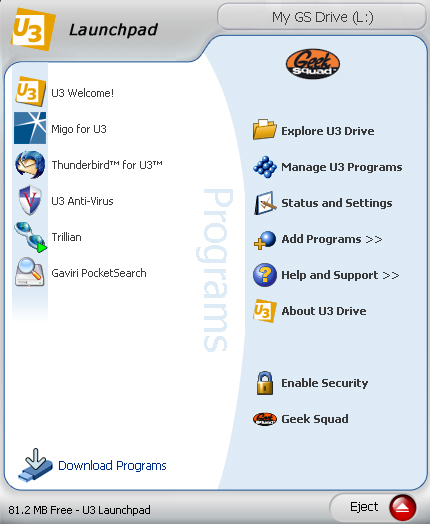
There is no restriction against any non-profit group using this article as long as it is kept in context with proper credit given the author. The Editorial Committee of the Association of Personal Computer User Groups (APCUG), an international organization of which this group is a member, brings this article to you. |
|
Number 284 - January 2007
|
|