 Number 294 - November 2007 |





|
| A Fat Client Diet | |
| by Drew Kwashnak, Danbury Area Computer Society | |
|
Do you have a number of older, slower machines that are still too good to throw away, but not powerful enough to run anything modern or useful? Does the idea of maintaining multiple computers with updates and patches which are becoming more and more rare for older systems not sound very appealing? Does knowing which system has the file or files you've been working on all month, season or year drive you crazy? Do your kids fight because they want to use your up-to-date (or least virus-laden) system? I have found a solution for many of these issues and at September's Linux Special Interest Group (SIG) was able to demonstrate a taste of that solution; Linux Terminal Server Project (LTSP)[1] also known as "thin client" computing. According to Wikipiedia [2] "A thin client (or a lean client) is a network computer without a hard disk drive, which, in client and server applications, is designed to be especially small so that the bulk of the data processing occurs on the server." and "In contrast, a thick or I installed Edubuntu[3] because it is made from Ubuntu[4] which is easy to use, setup and maintain, and Edubuntu is designed specifically to make setting it up as an LTSP server as easy as can be. After an hour and just over a dozen questions nicely documented on the Edubuntu website [3a], I had the server up and running on my Dell Optiplex GX 260 with 2.0 GHz Pentium 4 and 512 MB Ram and a gigabit Network Interface Card (NIC). You can set up an LTSP server with any Linux distribution such as RedHat[5], SuSE[6], Debian[7] or Ubuntu. Edubuntu recommends at least 256MB RAM plus 128MB per user as sufficient to run office applications and a web browser for the server. The thin client requires a Pentium II with 48MB RAM and a 2MB display card while a Pentium II/300 with 64MB RAM and a 4MB display card or better is recommended. Naturally, the more CPU, RAM and bandwidth the server has, the faster all the systems will run, the more clients you can connect at one time and the smoother video playback and resource hogging applications will run. |
Edubuntu is a version of Ubuntu Linux geared towards use for schools in classrooms, office and/or computer labs with a number of office applications and edutainment programs pre-installed. Just about any application for Windows or OS X has an equivalent application available in Linux and it is usually Free (free as in "free speech" as well as "free beer"). Some of the applications included are: Firefox[8] browser, OpenOffice[9] office suite, Evolution[10] email and calendar client (like Outlook), Dia[11] flowcharting, Blender[12] 3D modeler, GIMP[13] image editor (like Photoshop), Scribus[14] desktop publisher, Totem[15] video player, Kino[16] digital video editor and much more. Keep in mind, all, except for Evolution, Totem and Kino, are available for Microsoft Windows too. To get started once the operating system and LTSP are installed, hook your computers up to the network. Edubuntu and other LTSP websites recommend a system such as the illustration below. 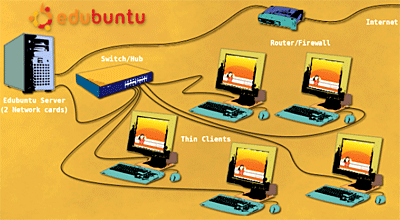
|
|
Number 294 - November 2007
|
|