 Number 296 - January 2008 |





|
| Which of the following is an item for storing computer data? | |
|
by Corinne Goeke, Computer Club of Green Valley, Arizona Cmgoeke@yahoo.com | |
|
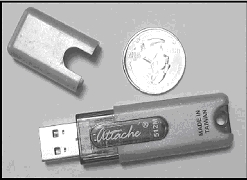
A) Thumb Drive B) Jump Drive C) Flash Drive D) Key Drive E) Memory Stick F) USB Stick G) UFD H) All of the above If you guessed H, good for you. All of the above names refer to UFDs or USB Flash Drives. USB, of course, refers to those little rectangular ports you can find (although there never seems to be enough of them) on the back and front of most computers. So what is a UFD? You see them connected to people's key chains, hanging around necks on a cord and stuck in pockets and purses! Simply put, a UFD is a really convenient data storage device. Think of a one-gigabyte UFD as being 694 floppy disks all packed into a two-inch long by 1/2-inch wide package. UFDs are data storage devices that have replaced CDs, floppies and other methods of carrying data from computer to computer. Plug one into a USB port on any computer, and you can read and write files on it. It is now the method of choice for transporting data that you need often. In fact, there is a special class of UFDs called U3 that can also store applications. Plug one of these UFDs into a computer, and you can run Mozilla Firefox, Open Office, or even utilize an operating system such Linux. The cost of a UFD depends upon the number of bytes it can hold. A 64 megabyte UFD used to be considered more than enough storage. But as the size of data files has increased, so has the size of UFDs. Fortunately, the prices for large storage has dropped considerably. You can pick up a 1 Gigabyte UFD for around $15. A large UFD currently available is a 16 Gigabyte that sells for $133 at www.newegg.com Finally, your choice of UFD can reflect your individuality. You don't have to settle for the standard gray plastic housing. You can buy UFDs that look like twigs http://inhabitat.com/2006/02/08/oooms-twig-usb-drive/ or even animal characters http://lab.mimoco.com/ |
So, if you find you need to transport data files from computer to computer, a UFD is an easy solution. They are available anywhere you can buy electronics. A word of caution. To avoid losing data, be sure to eject a UFD before removing it from the USB port. You can go to MyComputer, right click on the UFD device and select eject. Or you can use the Safely Remove Icon on the lower right corner of your desktop. 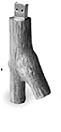
A word of caution. To avoid losing data, be sure to eject a UFD before removing it from the USB port. You can go to MyComputer, right click on the UFD device and select eject. Or you can use the Safely Remove Icon on the lower right corner of your desktop. This article has been provided to APCUG by the author solely for publication by APCUG member groups. All other uses require the permission of the author (see e-mail address above). |
|
Number 296 - January 2008
|
|