 Number 305 - October 2008 |





|
| Using CrossLoop to Troubleshoot and Control Remote Machines | |
|
by Vinny La Bash, Sarasota Personal Computer Users Group, Inc. | |
|
Third party Windows applications are rarely examined in this column, but CrossLoop is too good a utility to ignore. Trying to walk someone through a computer problem over the telephone is often an exercise in frustration. There is no substitute for seeing what is actually on a user's screen to find out the root cause of a problem. Vista has a built-in support tool known as Remote Desktop, but far from making the process easy, it has a tendency to confuse those with no technical background. Remote Desktop makes it rough on those who don't know how to handle the added complications of firewalls and routers. CrossLoop, which is a free remote support utility, could be an excellent solution. CrossLoop shields users from tricky situations involving communicating through routers, firewalls, and other potential obstacles. Setting up a communications session between two computers physically separated, but connected through the internet, is reduced to a process hardly more complex than turning on your TV. Those concerned about security can relax. CrossLoop uses something called TightVNC which safeguards data with 128 bit encryption. Crossloop is useful for people who want to train or support others remotely. If you're an experienced web surfer, for example, and need to show someone how to access a disk drive or retrieve a lost document, CrossLoop allows you to take control of their computer screen, and show them exactly how to do it. Hard core geeks may not be satisfied with CrossLoop. It's not complicated enough. It works better than most similar commercial utilities, and your technically challenged friends and relatives will find it aggravation free. You can download the program without charge from Another benefit of TightVNC is the built-in 128 bit encrypted security. When you begin a communications session, the program generates a new 12 digit access code. The access code then generates the encryption codes giving you an additional layer of security. Not bad for a free utility. |
Running the program is so easy it's almost boring. As you can see from the illustration, the interface is simple and straightforward. Assuming you started the session, the next step is to communicate the access code to the person you are communicating with. You can do this by email, telephone, screaming into the next room, etc. After starting the session, your friend types the access code into the box and clicks Connect. When the Connect button is clicked on both sides the two PCs are linked. 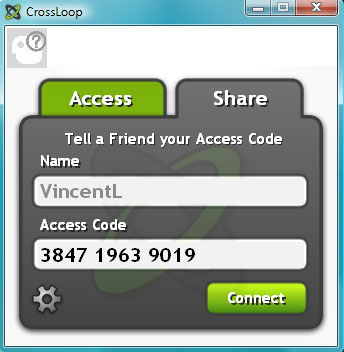
This method of troubleshooting a remote PC eliminates all the hassles of trying to interpret what an inexperienced user is attempting to explain. It's difficult to imagine anything less complex than a one button interface. With 128 bit encryption built in, it's tough to beat. Other applications that make such connections possible have been available for years, but nothing I've seen makes it as simple as CrossLoop. Copyright 2008. This article is from the August 2008 issue of the Sarasota PC Monitor, the official monthly publication of the Sarasota Personal Computer Users Group, Inc., P.O. Box 15889, Sarasota, FL 34277-1889. Permission to reprint is granted only to other non-profit computer user groups, provided proper credit is given to the author and our publication. |
|
Number 305 - October 2008
|
|