 Number 314 - July 2009 |





|
| Driver Query Helps Resolve Driver Problems | |
|
by Vinny La Bash, Sarasota Personal Computer Users Group, Inc. | |
|
Anyone using Vista for any length of time knows that most of the common driver problems were resolved long ago. Advances in computer technology including removable devices however, have called attention to problems that may be caused by device drivers that are no longer needed, but still installed on the system. These drivers can become corrupt over time. If they become inadvertently enabled they can cause memory conflicts which under some circumstances could crash your system. Most people beyond the novice level have some familiarity with Device Manager, but are usually not knowledgeable with its limitations. They know that Device Manager will allow a rollback to a previous version of a driver if problems are encountered, but few know that Device Manager has no way of keeping track of a device driver's history. This is important because you can't document which version of a device driver is good and which version could cause problems. You can get around this limitation by using a command-line tool called Driver Query that will track the history of all the device drivers on your system. From the Start Menu, open Accessories, and activate the Command Prompt. Type driverquery.exe at the command line and you will see a list of all the device drivers with some basic information included. This list by itself won't do you much good. You need to use some command-line switches to get the information that you need. At the command prompt type: DRIVERQUERY /FO:CSV /V > C:\ DRIVERINFO .CSV DRIVERQUERY is the primary command that tells the operating system to run the query. The /FO switch says you want the output to be formatted. CSV (Comma Separated Variable) tells Vista to format the output so it can be displayed in a spreadsheet. /V (Verbose) tells the query to blab its head off and tell everything it knows about each driver in the system. C:\ says to put the output file in the root (primary) directory of the primary drive where your operating system is installed. This makes the file easy to find in case you can't remember where you put it. DRIVERINFO.CSV is the name of the file with an old DOS style extension. You can name the file anything you want, but do end it with the CSV extension or you might confuse your spreadsheet when you try to open it. After creating the file, open your spreadsheet, click the file open icon and in the File name: box type:C:\DRIVERINFO.CSV By opening the file this way you don't have to get into DOS commands. You may, of course, use DOS if you feel Vista isn't complicated enough. |
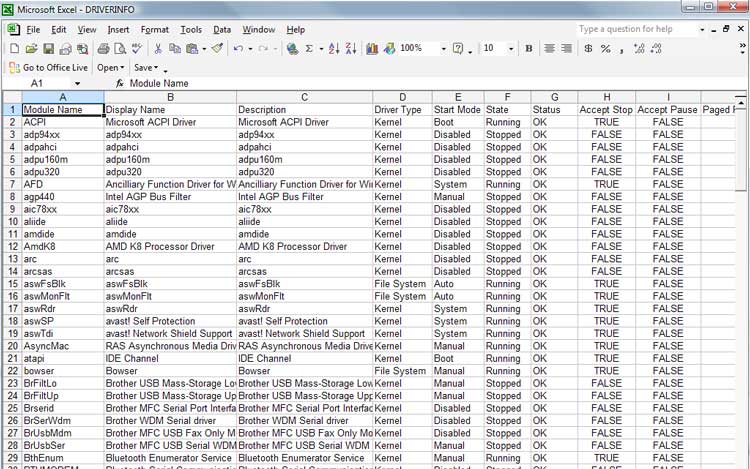
Your spreadsheet will resemble the illustration. After expanding the columns you will have to scroll horizontally to see all the available information. The amount of information for each driver has greatly increased, but you still don't get the driver version. Tracking driver changes is possible if you run the query periodically and compare the Link Date column for changes. It's clunky and cumbersome, but it does the job. Another important piece of information that's missing is any data about whether or not the driver is signed. A signed driver is a device driver that includes a digital signature which is an electronic security mark that tells you who published the driver. It also indicates if the original software has been altered in any way. Signed drivers provide assurance that the software actually comes from the manufacturer and hasn't been changed. This exercise is an excellent illustration of the laws of information availability. Copyright 2009. This article is from the June 2009 issue of the Sarasota PC Monitor, the official monthly publication of the Sarasota Personal Computer Users Group, Inc., P.O. Box 15889, Sarasota, FL 34277-1889. Permission to reprint is granted only to other non-profit computer user groups, provided proper credit is given to the author and our publication. |
|
Number 314 - July 2009
|
|