 Number 218 - July 2001 |




|
| Restoring Netscape Data Files After a Crash | |
| by Bill Draper, Coastal Computer News, Dec 2000 | |
|
When the hard drive died,
I felt downright righteous for having backed up data files completely
only a few days before. So --replace the hard drive, (and it was under
warranty), install the applications again, copy the data to the right
places, and I am back in business. It did not work out that way.
Once the new hard drive had been installed, the flrst order of business was to get back on the 'net. Having had the foresight to save the downloaded copy of Netscape 4.75 to a CD, Netscape was installed and the data files, Users, Mail, Messenger, Address Book, Inbox, Bookmarks, etc., were copied to near their former locations. Firing up Netscape, checking out Local Mail, Address Book, etc., and attempting to see if I have everything, brought grief. An error message came up, saying, "You may not have permission to write to these files. Check your permissions and try again." The word permission is not even listed in the Help files. I have a Netscape Manual purchased for $10 within the past year --that word is not in the index, table of contents, or anywhere else in the book. Of particular concern was the Address Book, which defied all attempts to open. It is there; and it seems to be about the correct file size. In Netscape Messenger, under the Local Mail folder, and in addition to Inbox, Drafts and Sent sub-folders, I had folders for Personal Stuff, Paint Shop Pro, Publisher, working folders with saved information from messages. I am denied access, lacking permission! I left my troubles on the CAUG Message Board, www.caug.org, and no help came. Jack Hord had lost a hard drive on a laptop, and Netscape was retrieved with minimal difficulty; he said. All he had to do was "...reset the local mail directory ..." (Edit > Preferences > Mail & Newsgroups > Mail- and Local Mail Directory under the Mail dialog box.) This did not work for me.. In the month or more of futile efforts, it seems that someone had suggested checking file attributes. I distinctly recall removing checkmarks from Read Only file attributes. This had not been successful. Wipe Out the Old Netscape Application Files. David Burke, our chief nerd, was consulted. His response: Vestiges of previous installations are corrupted and must be removed. (Remember, I had started from a pristine, newly formatted drive, but had worried it with repeated attempts to get Netscape data back to work.) With David's encouragement, I edited the Registry and ostensibly wiped out Netscape from the Operating System. I had checked in on another tech source, www.allexperts.com, and was given similar advice. It's the File Attributes, Stupid! While limping along with Outlook Express, which I dislike, the weekly SYSOPT Tech Notes was received. I am an avid fan of the SysOpt folks, subscribe to their news reports, and use www.sysopt.com for information. (I am so impressed with this outfit and their webpage that I frequently reprint their material in this magazine, with permission, of course.) On the night before Thanksgiving, I sent the following to the SysOpt Message Board: "Tech Support Forum -Had hard drive failure -had backed up data well, copied to CD. Got computer going again, put Netscape data where it should have been, installed a new Netscape 4.75, and apparently all of it is picked up --all the folders are named and file sizes are consistent. Attempt to open any folder, and the following error message comes up: "You may not have permission to write to this file. Check permissions and try again." "WHAT PERMISSIONS?!!? The word is not even listed in the Index. Yeah, I know--I lost the old configuration but the new settings are word-for-word like the old one. |
"As a user group
newsletter editor, I have set up several folders under Local Mail
-really need to access them.
"Got the Bookmark to work. Clicked on Bookmark in Windows Explorer, it opened, and since then a Ctrl B will bring it up every time. In Windows Explorer, I can click x2 on Inbox and it can be read but - that's it. Sent 2 emails to Netscape tech support--no answer. "Will be very grateful for suggestions. Permission granted to give name, email, etc., for replies -whatever..- Thanks" Thanksgiving Day I received the following: "Check your file attributes: Right click, properties. If anything for Attributes is checked, uncheck it, hit OK, then reboot. If that doesn't work, I don't know -sorry. SoSocalgal. Moderator, SysOpt.com" It worked!--Perhaps I had failed to reboot after removing check marks from the file attributes earlier. The so-called permissions referred to in the error message really meant to remove the check mark from the Read Only attribute of the Netscape data files. The Address Book appears to be corrupted; in the future, before manipulating Netscape data files, I will work from copies and keep the original backup files intact. Saving An Address Book Doyce Hester does a discrete backup of his Netscape Address Book. The process amounts to exporting the Address Book to another file and to another location. The steps are as follows: 1. Select the Address Book on the Communicator component bar. If you have more than one, select the one you want to save. 2. From the File menu, select Export. 3. Type a file name for the address book, and choose the file type, *.ldif. Specify the location where the saved Address Book file will be stored. 4. Click Save. The drill to get Netscape restored and running - 1. Restore, using copies of data files.. 2. Ensure that remains of previous Netscape applications have been removed: consider editing the Registry and removed the vestiges of the Netscape program.. 3. Ensure that the file attributes of all Netscape data files have had all check marks removed, those checked around the black arrow as shown below: 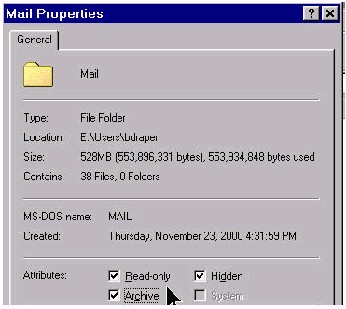
|
|
Number 218 - July 2001
|
|