 Number 222 - November 2001 |





|
| Personalizing Your New Software Quicken. e.g. | |
| by Bob DeLargey, July 2001 PC News, 1960 PC Usder Group | |
|
Starting on the Right Track
When I get a new piece of software, my normal impulse is to install it PDQ and start turning out documents or pictures or whatever it does. Learning features, choosing preferences, and configuring it will come naturally with usage, eh? But, when I saw the broad scope of Quicken and riffled its 550 pp. manual, I realized that a more orderly approach was in order. Here was a program that could entwine almost every part of your life - household bookkeeping and bill paying, taxes of all types, investment planning, portfolio management, retirement planning, etc. Better I should make haste more slowly and get it right! So, I ploughed through the several Getting to Know chapters, and viewed the ShowMe Videos. I decided to keep a double set of books - one with my 11-year old DOS-based home finance program and one with Quicken - until I felt confident with the newcomer. Choosing the Cubbyholes The foundation of any accounting system is the Chart of Accounts (C of A), which tells you what kinds of financial items you can keep track of. The C of A puts labels on the cubbyholes for each type of info. Under Quicken, assets and liabilities are called Accounts, and incomes and expenses are called Categories. Q has a built-in list of 100-odd accounts and categories, artfully chosen to fit the typical family. You can easily add more or substitute your own choices to fit your spending patterns, hobbies, small-business involvements, investments, etc. Having ten years of experience with my old program and C of A, I decided to replace all of Q's C of A with my own choice - drawn quite a bit from the old program. Two typical samples of the new categories: 184 R's doc. & hosp. 145 Car #2 Maint. & tires Since Q sorts numero/alphabetically, the 3-digit number causes all ten of the medical expense categories to be displayed in a logical group, numbered from 177 to 186. Similarly, all six auto expenses appear as a contiguous group. Moreover, by using the same numbers as in my old system, I can easily remember the most-used ones. Expense items use category numbers from 130 to 200, and income items are from 070 to 100. Asset and liability items use account numbers from 001 to 129. That leaves from 201 to 999 open for growth and new ideas. The account/category names have other uses. For example, the asset account number, 009 Trust CP Honda 2000 LX6 tells us that this asset is held in our Trust, is owned as community property, is a year 2000 Honda model LX-6. Thus, there is room for lots of creativity in setting up the initial Chart of Accounts. And the more you think it through now, the less backtracking (re-entry of data) will be needed later. Using FIND HOOKS My wife and I are dyed-in-the-wool subscribers; we peruse about two dozen periodicals. The publishers bombard you with desperate renewal offers, many of which infer expiration is nigh - even though it's many months away. Using Q's FIND function, we hit on a way to control this chaos: In every transaction bearing on subscriptions, we include these letters: magaz. So when we want the status of any periodical, we FIND magaz, and all the subscriptions and renewals appear. They can be sorted by Payee, Date, Amount, etc. and printed as seen in the insert below. 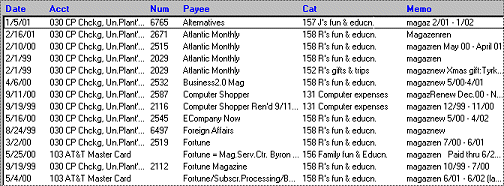
The same technique (burying FIND HOOKS) can be used many ways to sharpen Q's usefulness. Deferred Taxes - Ticking Bomb Some investments, like annuities, accrue deferred taxes on earnings. The day of reckoning comes when you liquidate the investments, at which time the deferred taxes come due as taxes on ordinary income. Thus, if you have a lot of deferred taxes, your net worth or liquid assets can be a lot smaller than first appears. The Problem: How to keep track of retirement resources on a realistic basis. A derivative problem is how to manage the draw-down of resources with the least tax whack. These problems can stretch over several decades, and their magnitude can be awesome. The remedy I found was to . . . 1) Make an educated guess as to what the effective tax rate on deferred taxes might average over the years of draw-down. I came up with 30%, although I would hope to beat it; maybe 25%. |
2) Each month as I log in
the earnings of various investments, I also log in the 30% estimated
tax on tax-deferred earnings - using a separate liability account for
each tax-deferred investment.
Thus, I can reckon our net worth and liquid assets either way - with or without the tax liability. Of course, my approximation has no standing with the tax laws or accounting practice. Can You Help with a Problem? There's an accounting problem I haven't found a very neat answer for. Maybe you can help. It's how to track all the ins and outs of MEDICAL CLAIMS, from the date of first treatment through the settlement of the final health insurance claim. I see enough gray heads at our meeting to suspect other members may have wrestled with this problem, and perhaps prevailed. If so, I'd appreciate your help. For the uninitiated, let me spell out the spending, paying, and reimbursement process as a reminder of the variables that must be accounted: My presentation of The Problem is from the viewpoint of being fully retired. Those who are still employed may have different accounting needs and company resources. Besides the vigilance required to pay bills and receive reimbursement, the accounting system must also handle the income tax aspects - assuming one goes for Itemized Deductions on medical expenses. The bookkeeping to meet IRS requirements adds complexity. My Past Medical Accounting For several years I have had two branches to my medical accounting: This led to considerable duplication of effort, and so I tried to devise something under Quicken which could do it all. New Medical Accounting? I decided to try creating a Liability Account for each incident. In this Liability Account register, the first entry would be the doctor's (or clinic's or lab's) initial charge, followed by entries for each event or charge related to the initial one. As shown in the example at page bottom, the balance due in a medical Liability Account may grow at first - and then shrink to zero as discounts, reimbursements, and payments are applied. The final stage involves following up on the insurers to be sure they haven't lost the claim in the cracks, or rejected it. I haven't yet figured how best to tie the medical liability accounting to income tax preparation. Nor tackled how to control the scores of prescriptions per year. I'm guessing that the 1960PCUG [User Group] has dozens of Quicken users. If any of you have found a better way to handle medical claims, I'd be tickled to hear from you! (Members helping members, yunno.) Bob has contributed articles to PC News for many years - and hopes to do so occasionally in the future. Contact Bob at rjdel@qaccess.net 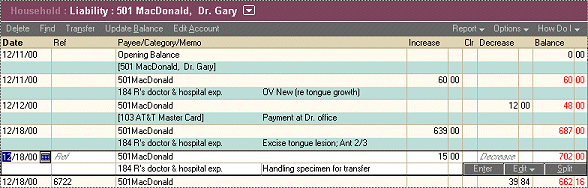
|
|
Number 222 - November 2001
|
|