 Number 253 - June 2004 |





|
| Is That a PC in Your Pocket/Purse? | |
|
by Lee Schwab, (KISS = Keep It Simple Schwab), Napa Valley Personal Computer User Group, Inc., April 2004 | |
|
For some people, the
Pocket PC (PPC) is an incredibly useful tool while other people are not
familiar with the Pocket PC. Some people confuse the Pocket PC with a
Palm, which is similar in appearance but is a different device that uses
the Palm operating system. Below is an overview of what is included in a
Pocket PC and how it helps me organize and simplify my life.
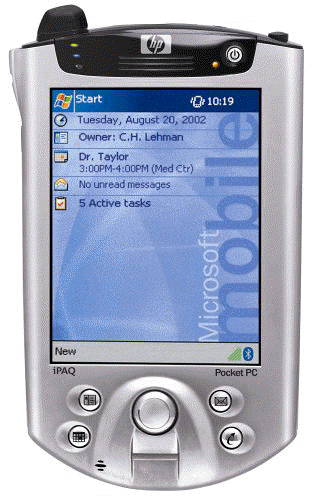
The Pocket PC uses a scaled down version of the Microsoft Windows operating system which is called Microsoft Windows Mobile 2003 (replaced Microsoft Pocket PC 2002 in June '03). Pocket PCs ship with lots of software, are very powerful, lightweight (4 - 7 ounces), small enough to carry in your pocket or purse (approximately 3" wide and 5" long), and easily synchronized with your desktop or notebook PC. Here are some Pocket PC features: ActiveSync: This third party software automatically synchronizes the data on your Pocket PC with your desktop or notebook PC. You can also use it to transfer files between the devices. Because I use the Pocket PC extensively, I synchronize them almost daily. Calculator: Use it as you would any simple math calculator. Use it to figure the tax on a purchase, the unit price of grocery items, the percent of a discount, tips, etc. Third party calc-ulators are also available for more sophisticated or specialized calculations (i.e., financial, scientific, statistical). Calendar: Keeps track of your appointments (who you are meeting with, where to go, what time, and notes). You can also set up reoccurring appointments, a reminder alarm, or cut and paste appointments. Information can be viewed by day (with a choice of two formats), week, month, or year. Communications: Wi-Fi and/or Bluetooth may be included in the Pocket PC or added using the SD (Secure Data) or CF (CompactFlash) slot. Contacts: Use this to organize address book information (i.e., name, address, phone, email). Excel: This Pocket version of Excel supports 100 functions and formulas, rows, columns, and spell checker. Use it to keep track of expenses when traveling, rosters, fundraisers, etc. Expansion: Many Pocket PCs include slots for CF (Compact Flash), SD (Secure Data), and/or PC Cards. Use them to add memory, a camera, communications capabilities, etc. Find: Search the entire Pocket PC or a specific area (i.e., calendar). Use it to find a contact, a specific appointment, something in a Word or Excel document, etc. Games: Solitaire and Jawbreaker are included with the Pocket PC. I am not a gamer, but there are lots of third party games available. Inbox: An email application that lets you send, receive and synchronize email. Infrared beaming: Beam information between devices. My husband and I beam appointments and documents between our Pocket PCs. Internet Explorer: This software program is included on the CD-ROM that accompanies the Pocket PC. Memory: Pocket PCs come with 32 - 128 MB built-in RAM and 32 - 4 MB ROM. Microsoft Reader: This eBook reader can be used to read electronic books. Use it to read the Pocket PC manual, books that are on the |
accompanying CD-ROM, or books that are downloaded. It includes search capabilities to help find a section or word in the eBook.
MSN Messenger: Instant Messenger application. Notes: Create handwritten or typed notes, drawings, or make a short voice recording. Pictures: View your .JPG pictures in thumbnail or full screen. This is a good place to keep an electronic picture of your spouse, children, or special events because it can easily be updated and the edges do not get frayed. Power: Many Pocket PCs include a main battery, backup battery, and power cord for external power. The suspend mode and brightness levels can help conserve battery life, so the Pocket PC can be used all day without a charge. If the Pocket PC battery is allowed to run all the way down, data may be lost. It is recommended to fully charge the batteries every night. Price: Depending on features and manufacturer, the prices range from $199 to $649. Processor: Chips (Intel, Samsung) and speeds (200 - 400 MHz) vary depending on the device manufacturer. Screen: Most screens are 3.5" (measured diagonally) and are Transflective TFT or Reflective TFT. Tasks: Keep track of your "to do" or "honey do" tasks. You can prioritize the tasks so the most important tasks will be at the top of the list. Text Entry: You can enter text using the software keyboard, block recognizer (graffiti), letter recognizer, or transcriber (cursive, print, or mixed handwriting recognition). As you enter text, words are suggested to help you complete the words. Some Pocket PCs have a built-in miniature keyboard where your thumbs are used to enter or you can purchase a foldable keyboard (Targus makes good and sturdy keyboards). Voice Recorder: Make short recordings and playback using the Notes application. Windows Media Player: Use to play MP3 or Microsoft Audio Format music, or Microsoft Video Format videos. Word: The Pocket version of Word is incredibly useful for keeping reference documents, taking notes in meetings, writing articles, keeping shopping lists, etc. The Pocket PC also includes lots of systems software (Asset Viewer, External Keyboards Functions Support, File Explorer, Infrared OBEX beaming, Server Sync Client, setup/configuration utilities, Terminal Server Client, VPN Client, etc.). I bought a Hewlett Packard iPAQ 3800 Series Pocket PC in 2001 and my husband is using it now. This year I bought a DELL Axim5, but I would not recommend a DELL because the screen was badly scratched within one month and the calendar intermittently and randomly changes appointment times (i.e., 1:00 p.m. becomes 2:00 p.m.). I will probably buy a Hewlett Packard iPAQ, but there are many choices. Pocket PCs and cell phones have teamed up and are called smartphones. These devices use the Microsoft Windows Mobile for Smartphone software. The smartphones have to make some compromises in their form and function. To learn more about Pocket PCs or to make a purchase, check out the magazines and websites below. My favorite is the Pocket PC magazine (their 2004 Buyer's Guide is available now). Magazines: Handheld Computing (PPC & Palm devices) Mobility (mobile and wireless) Pen Computing (mobile computing & communications) PocketPC (Windows Mobile PPC reviews, comparisons, & smartphones) Wireless (wireless communications) Websites: www.amazon.com www.hpshopping.com www.mobileplanet.com www.PocketPCmag.com www.pcconnection.com www.tigerdirect.com This article is brought to you by the Editorial Committee of the Association of Personal Computer User Groups (APCUG), an international organization of which TBCS is a member. Lee Schwab is a long time member of the Napa Valley PC User's Group and has served NVPCUG as an officer for ten years. She served as Editor of the dVINE Blues newsletter, and is the President and Chairwoman of the Board for the CyberMill, a nonprofit 501(c)(3) organization where people (especially at-risk youth) learn to use technology. |
|
Number 253 - June 2004
|
|